Vikunja 2.7.0: Six security fixes, an MCP server, and a new date picker
2026-10-02
A month after 2.6.0, here’s 2.7.0. It’s a big one: 856 commits, 317 of them fixes, 62 new features and 58 dependency updates. It also fixes six security issues, so please update as soon as you can.
At this point, I wonder whether we will get a release without security fixes any time soon. Thanks AI!
Security#
This release fixes six security vulnerabilities, one high and five medium:
- Any page on localhost could take over your session, because the login cookie was sent along with requests from other sites and
localhostorigins are allowed by default. (advisory, thanks to @arthurscchan, @DavidKorczynski and @AdamKorcz!) - Revoked sessions kept getting live notifications, since the live connection never checked whether its session still existed. (advisory, thanks to @Tan-JunWei!)
- Removed collaborators kept a live feed of the project through webhooks they had created, which are now deleted when they lose access. (advisory, thanks to @euriconicacio and @Tan-JunWei!)
- Read-only shares on child projects were ignored when the person had write access to the parent, a regression in 2.6.0. (advisory, thanks to @Viv3kGupt4!)
- Members with write access could delete admin link shares, so managing link shares now requires admin access to the project. (advisory)
- A user without any projects could fill the database by creating a saved filter, which made Vikunja write rows for every task on the instance. (advisory, thanks to @Tan-JunWei!)
The login cookie fix means the desktop app before v2.3.0 has to log in more often, and instances with the frontend and API on different domains lose cookie-based session refresh.
Use Vikunja with your AI assistant#
Vikunja now has an MCP server. If you use Claude, Codex, Mistral Vibe or another assistant that speaks MCP, you can connect it to your instance and ask it to create tasks, look up what’s due, move things between projects or comment on a task.
Head to Settings → MCP, create a token and pick your client. Vikunja shows you the setup steps for it, with your instance’s address and the token already filled in. You can create read-only tokens if you only want the assistant to look things up and not edit anything. The assistant can do what the token allows and nothing more, and things like your account settings, webhooks and link shares are off limits completely (#3860, #3864).
There’s a guide on connecting your client in the help docs.
A new date picker#
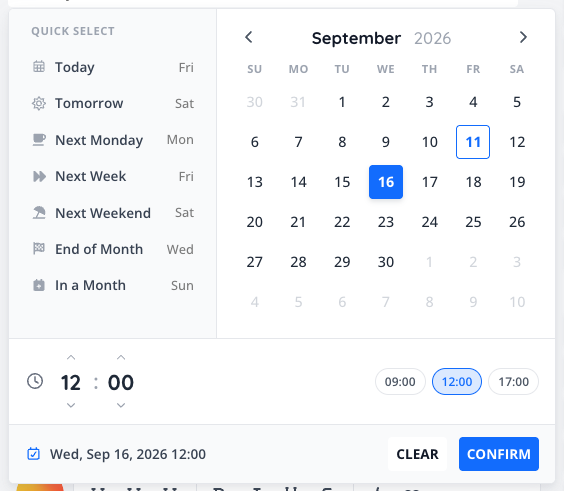
The old date picker never quite fit in with the rest of Vikunja. It looked like it came from a different app, and on phones it didn’t fit properly on the screen.
The new one matches the rest of Vikunja. It has shortcuts like “tomorrow” or “next week”, a time control you can type into or step through, and it works with the keyboard. It’s used everywhere you pick a date: due, start and end dates, reminders, postponing a task, date range filters and the Gantt chart. On phones, it opens as a sheet from the bottom of the screen, as do other popups (#3854).
Outgoing proxy support#
If your server has no direct internet access, Vikunja can now send all of its outgoing requests through a proxy. That covers webhooks, avatars, Unsplash backgrounds, migrations from other services, OpenID Connect and the Pro license check.
Vikunja reads the usual HTTP_PROXY, HTTPS_PROXY and NO_PROXY environment variables, or you can set one proxy for everything in the config. The proxy can live on your internal network without turning off Vikunja’s protection against requests to internal addresses (#4015, #4016).
If you already use outgoingrequests.proxyurl for webhooks: OpenID Connect requests now go through it too, so make sure the proxy can reach your identity provider. Check out the docs for all the details.
Smaller new things#
- Overdue task emails are now split in two. The daily overdue mail used to list every task you created, were assigned to or followed in one long list. If you follow a busy project, that could be hundreds of tasks that aren’t yours. Now it has an “Assigned to you” section and a “Tasks you follow” section (#3887).
- Gantt bars show the full title on hover when the bar is too narrow to fit it (#3917).
- Imports don’t time out anymore. Importing a big Vikunja export used to run inside the upload request, so a proxy in front of Vikunja might have given up after 30 seconds. Imports now run in the background, and the import page shows whether they worked and how far along they are (#3827).
Performance#
The load testing from the last release continued. On the same two 4-core servers with 3,000 simulated users, the slowest 1% of requests went from 260 ms to 22 ms, and CPU usage on both servers dropped from 82% to about 40%. With an 8-core API server, 10,000 users stay well under 50 ms. The full report has every run and number.
These changes did most of the work:
- Postgres connections now reuse their query plans instead of planning every query from scratch (#3721).
- Database connections stay open for 30 minutes instead of being closed every ten seconds. In the load test, that alone took the slowest requests from 110 ms to 26 ms (#3775).
- Working out what you have access to in nested projects used to be the single most expensive query, at 37% of database time. It’s now a simple lookup (#3838).
- Requests that only read data don’t hold on to a database connection for their whole lifetime anymore (#3790).
- Checking an API token used to cost about 3 ms of CPU on every request. It’s now basically free (#3791).
The frontend now uses the v2 API#
The whole frontend now talks to the server through the v2 API, with a client generated from the API description. The old code that talked to v1 is gone (#3684, #3941, #3997).
If you don’t notice anything, it works as expected. It’s groundwork that lets us build things like proper real-time updates in one of the next releases.
Reminder: if you’re building something on the v1 API, you’ll need to migrate away at some point. The v2 docs have the timeline and the steps to port your client.
Fixes and improvements#
- With both the username and email fallback turned on, logging in with an OpenID provider created a second account instead of linking to the existing one with the same verified email (#4012).
- Apple Calendar no longer fails with “the calendar could not be found” when synced via CalDAV (#3885). Times sent by calendar clients in UTC are now read as UTC. Thanks to @anandghegde for contributing this in #3883!
- Checking off an item in a checklist no longer strikes through the items nested under it (#3715).
- Pasting rich text into a description now keeps its formatting. Before, bold text and links were lost as soon as the text contained a hyphen (#4021).
- The table view shows now priorities for done tasks too (#4064).
- The Todoist migration now keeps task descriptions. Thanks to @blancqua for contributing this in #3819!
- A few errors shared their code with an unrelated error. They now have their own codes: a file that’s too large is 4035, a failed import is 14011 or 14012, a malformed OpenID scope is 1038, a reused 2FA code is 1039 and a locked account is 1040. If you check for these in your own scripts, see the error code list (#3772, #3901).
Vikunja Pro#
Vikunja Pro is still in early access behind a waitlist, but we’re getting closer. If you are on the waitlist and can’t wait, please reach out! We’re very interested in learning what you plan to use Pro for and would love to talk.
New to Vikunja?#
Vikunja is the open-source, self-hostable to-do app. It lets you organize all kinds of things, from your shopping list to a multi-month project with multiple team members. Different ways to view, filter and share your tasks make this a breeze.
Check out the features page to learn more about all of its features.
How to Upgrade#
To get the upgrade, simply replace the Vikunja binary with the new release from the downloads page or pull the :latest docker image.
You can also check out the update docs for more information about the process.
Closing#
As usual, you can find the full changelog in the GitHub repo.
If you have any questions about this release, please reach out either in the community forum, Bluesky, or Mastodon.
Thank you for using Vikunja, and I look forward to bringing you more enhancements in future updates!