Vikunja 2.0.0: Many security fixes and a few breaking changes
2026-02-25
Only two weeks since the last release and we’re already at 2.0.0!
The new major release was prompted by a security report that led to rebuilding large parts of the session authentication infrastructure in Vikunja, which is a breaking change. Because that meant a new major version was inevitable, we also took the chance to remove support for Typesense, as announced in the 1.0.0 release. Read on to learn more!
This release contains a total of 188 commits, of which 30 have been dependency updates. Most commits are fixes and small improvements.
Security#
This release contains four (!) critical security fixes, each with a CVE. Please update as soon as you can!
Path Traversal and Denial of Service in CLI Restore (CVE-2026-27819)#
The Vikunja CLI’s restore command, which lets administrators restore a backup from a zip file, did not properly check file paths inside the archive.
A specially crafted zip file could write files to unintended locations on the server, potentially overwriting important data.
On top of that, a malformed archive could crash the restore process right after the existing database had already been wiped, resulting in complete data loss.
A closer look at the restore functionality revealed more issues that a malicious zip file could exploit, all of which have been fixed by introducing proper sanitization and validation.
For more details, see the security advisory. Thanks to @JadenWangTAMU, @PaavanBagla, @architg1025, @nallamsaiv, and @michaelhurtado4 for reporting this!
Weak Password Policy and Persistent Sessions After Password Change (CVE-2026-27575)#
While Vikunja enforced a minimum length of 8 characters for passwords during registration, it accepted very weak passwords below the limit for password changes. Additionally, when a user changed their password, all previously active sessions remained valid.
This meant an attacker who had compromised an account could continue accessing it even after the victim changed their password. Both issues have been addressed: passwords now must meet minimum strength requirements, and all existing sessions are invalidated when a password is changed.
This fix prompted a broader rewrite of session management, see below.
For more details, see the security advisory. Thanks to @iamsampathk for reporting this!
Stored Cross-Site Scripting via SVG Attachment Upload (CVE-2026-27616)#
Vikunja allowed uploading SVG images as task attachments without sanitizing their contents. Since SVG is an XML-based format that can contain embedded JavaScript, an attacker could upload a malicious SVG file. It was possible to trigger a race condition that would let the browser render this SVG file, executing the malicious code.
This has been fixed by properly setting content types on attachments so that SVG files are no longer rendered inline by the browser.
Administrators should run the vikunja repair file-mime-types command after upgrading to clean up any existing affected files.
For more details, see the security advisory. Thanks to @iamsampathk and @sudo0xksh for reporting this.
Reflected HTML Injection via Filter Parameter (CVE-2026-27116)#
The filter URL parameter in project views was rendered as raw HTML in the page instead of being treated as plain text.
An attacker could inject SVG elements, links, and formatted text into the page.
This could be exploited by sharing a crafted project link, when the recipient opened it and clicked the “Filter” button (a routine action), the injected content would appear inside the trusted Vikunja interface.
This could be used to display fake “session expired” buttons or phishing messages that redirect to attacker-controlled sites.
The fix replaces raw HTML rendering with properly escaped text output.
For more details, see the security advisory. Thanks to @sudo0xksh for reporting this.
Breaking change: session management#
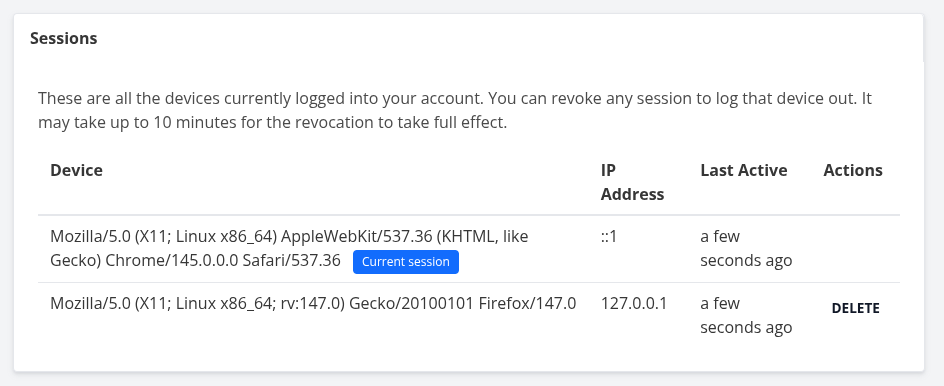
This change was prompted by the security report about session invalidation, as mentioned earlier. Essentially, to fix the security issue we had to rebuild the user session management.
If you’re only using the web frontend, this will not affect you, but you will need to upgrade the desktop client.
If you’re building on Vikunja’s API, you might need to change your integration. Check out the migration docs for a lot more info about how to do that.
We’re still working on an upgrade to the android app.
Breaking change: Typesense removal#
As announced in the 1.0.0 release, we are now fully removing support for Typesense.
To get similar search capabilities, please switch to ParadeDB. The docs on ParadeDB have instructions about switching from Typesense.
Breaking change: repair commands now reorganized#
The different repair cli commands repair-file-mime-types, repair-task-positions, repair-projects, and delete-orphan-task-positions are now properly grouped under a parent repair command.
If you’ve built scripts around this, you’ll want to upgrade them.
For more details, check out the docs.
New features#
Here’s a closer look at the highlights of new features added:
Attachment picker opens directly#
Clicking the “Attachments” button in the task detail sidebar (or pressing f) now opens the browser file picker immediately, skipping the previous two-step flow where you first had to reveal the attachments section and then click the upload button.
LDAP authentication with anonymous bind#
Vikunja previously required explicit bind credentials for LDAP authentication, which prevented setups that rely on anonymous binds. It now attempts an unauthenticated bind when no bind DN or password is configured, while keeping the existing authenticated-bind behavior when credentials are provided.
Thanks to @Quiwy for contributing this in #2226!
Comment sort order toggle#
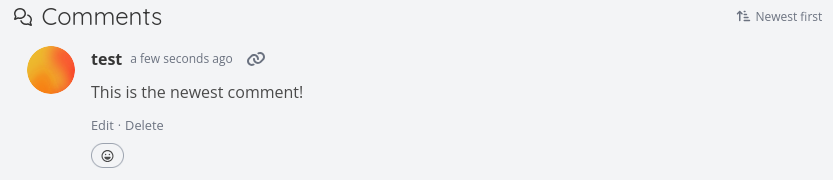
Task comments can now be sorted newest-first or oldest-first via a toggle button in the comments heading. The preference is persisted as a user setting and available via the API.
Gantt: partial dates and overlapping tasks#
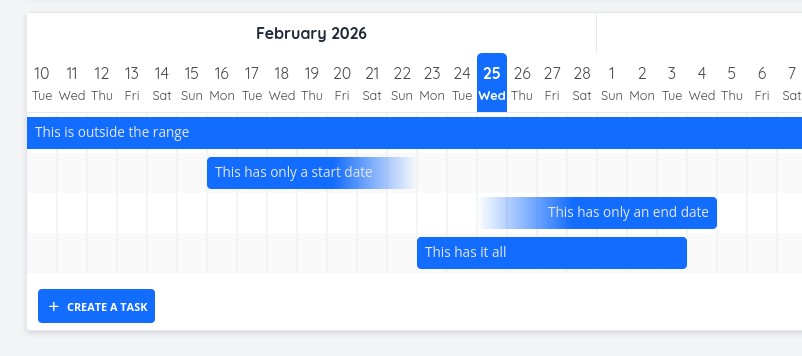
The Gantt chart now handles tasks that only have a start date or only an end date. These partial-date tasks render with a gradient fade effect to visually indicate the open-ended side, and drag/resize operations correctly preserve which dates actually exist.
Additionally, tasks that span the entire visible date range (start before and end after the viewport) are now correctly shown instead of being filtered out, and bar titles are clamped to stay visible when a task starts before the visible range.
Swedish language selection#
Swedish translations were recently completed on Crowdin, but the language was missing from the selection dropdown. It is now available as a selectable language in both the frontend and API.
Thanks to @mratingittar for contributing this in #2248!
Discard and reload confirmation modal#
When a task’s title has been modified on the server while you have unsaved local changes, Vikunja now shows a confirmation modal asking whether to discard your changes and reload or keep editing. This prevents silent overwrites and makes concurrent editing safer. Contributed by @NeoHuncho in #2154.
New CLI repair commands#
Two new CLI commands help administrators fix data inconsistencies.
repair-projects finds and repairs orphaned projects (projects where the parent does not exist anymore) by moving them to the top level of their owner’s hierarchy.
repair-file-mime-types scans all files in the database that have no MIME type set, detects the type from the stored file content, and updates the records.
You’ll want to run this after upgrading, if you have task attachments.
Check out the CLI docs to learn more about each of these commands.
How to Upgrade#
To get the upgrade, simply replace the Vikunja binary with the new release from the downloads page or pull the :latest docker image.
You can also check out the update docs for more information about the process.
Closing#
As usual, you can find the full changelogs in the GitHub repo.
If you have any questions about this release, please reach out either in the community forum, Bluesky, or Mastodon.
Thank you for using Vikunja, and I look forward to bringing you more enhancements in future updates!