Vikunja 2.4.0: Ten security fixes, Vikunja Pro, and a new v2 API
2026-07-19
A bit over three months after 2.3.0, we’re back with 2.4.0. This is a big one: 1093 commits since the last release, 156 of them dependency updates. There’s a lot to cover, including the first Vikunja Pro features, a brand-new version of the API, and ten security fixes.
Because the security list is long, let’s start there:
Security#
This release fixes ten security vulnerabilities. Most came from external researchers, plus one we found ourselves while reviewing the same areas of code. Please update as soon as you can.
Project and kanban access control#
A recurring theme this time is permission checks around kanban boards and the project hierarchy that weren’t as tight as the rest of Vikunja, so several of these look similar.
- Reading and completing anyone’s tasks through the kanban board (CVE-2026-55066). The move-task endpoint checked access to the column but not the task, letting any user read any task on the instance by its ID and mark it done. Advisory. Thanks to @hoangperry for reporting this!
- A share link could read every kanban board’s structure. Any share link could be pointed at any board on the instance to read its column names and creators, enumerating nearly every user (though not task contents). Link shares are now pinned to their own project. Advisory. Thanks to @Xelanos for reporting this!
- Wiping any kanban board’s layout (CVE-2026-55065). Deleting a project view cleaned up any board’s column layout and ordering without checking it belonged to your project, letting anyone wipe boards instance-wide (recoverable only from a backup). The cleanup now runs only on a properly scoped delete. Advisory. Thanks to @KadirArslan for reporting this!
- Dropping a project into someone else’s hierarchy (CVE-2026-54766). A broken write-access check let a user duplicate a project into anyone else’s hierarchy, where it could reach that project’s members. Duplication now checks write access on the target parent. Advisory. This one we found ourselves.
- Adding columns to someone else’s kanban board (CVE-2026-55067). An unchecked field let an attacker move a kanban column they own onto someone else’s board for defacement. The board a column belongs to can no longer be changed this way. Advisory. Thanks to @voraci0us for reporting this!
- Detaching a shared project without admin rights (CVE-2026-55064). The 2.3.0 admin-to-reparent fix missed detaching to the top level, so a write-only user could still detach a shared project and break its inherited permissions. Detaching now requires admin too. Advisory. Thanks to @AntarikshaAkhileshSharma for reporting this!
Authentication and credentials#
- Creating and deleting other people’s API tokens. By creating link shares until one collided with a target user’s internal ID, an attacker could list, create, and delete that user’s API tokens. Access is now tied to a real user account. Advisory. Thanks to @ryuyunseong for reporting this!
- Account takeover through OIDC email fallback (CVE-2026-62367). With the non-default “email fallback” option on, Vikunja linked an SSO login to a local account by email without checking the provider had verified it, allowing password-less takeover. A verified email is now required. Advisory. Thanks to @maskop9 and @evilgensec for reporting this!
- Password-reset links stored in plain text (CVE-2026-62376). Password-reset, email-confirmation, and account-deletion tokens were stored in plain text, so anyone who could read the database could use a pending token to take over an account. They’re now hashed at rest. Advisory. Thanks to @de3erve-hunter for reporting this!
- A limited API token could upgrade itself to a full login (CVE-2026-57458). A token scoped only to start the OAuth login flow could trade itself for a full, unrestricted session. The login flow no longer accepts an API token in place of a real login. Advisory. Thanks to @baradika for reporting this!
Vikunja Pro#
The biggest new thing in this release is Vikunja Pro: an optional set of features for self-hosted instances, gated behind a license key. I want to be upfront about it, because “the open-source project added paid features” is the kind of sentence that makes people nervous.
Nothing has been taken away. The free, AGPL-licensed Vikunja is exactly as capable as it was in 2.3.0, and no existing feature moved behind a paywall. Pro adds a small set of new features on top, aimed at teams and organizations, and buying a license is the main way to fund continued work on Vikunja. If you don’t set a license key, none of this appears and Vikunja runs exactly as before. It won’t even nudge you to buy a Pro license.
Three features ship under Pro in 2.4.0:
- An admin panel. A proper UI for managing users and projects across the whole instance: list everyone, promote instance admins, disable or delete accounts, and reset a user’s password (#3085, #3097).
- Time tracking. Per-task time entries with a running timer, a badge in the header while a timer is going (plus a favicon indicator so you can tell from a background tab), and time reports. Landed in #2874 and #2937.
- Audit logs. Structured records of important actions, so an instance admin can see who did what.
A few things I know people will ask: It’s all still AGPLv3, the Pro code lives in the same public repo under the same license, and the key just switches the features on. You’re paying for a working product and for the project to keep going.
If you ever stop paying, Vikunja keeps running and your data stays put. Only the Pro features switch off. This doesn’t mean everything new is Pro from here on either. Regular task-management features continue to land in the free version. And the things people often assume are enterprise upsells, SSO and LDAP, are still free and always have been. The Pro page covers more of these questions. If yours isn’t there, please reach out directly.
Pro is waitlist-only for now. I’m opening it up to more people over the next few weeks. If you want in, head to the Pro page and sign up. The Pro docs cover how licensing works, what gets sent to the license server (counts about the instance, never your project or task content), and how to set an instance admin.
This is the first time I’m announcing Pro anywhere, and 191 people have already found it on their own and joined the waitlist. That makes me hopeful this model can actually make Vikunja sustainable.
Highlights#
With the security stuff and Pro out of the way, here’s what else is new.
A new v2 API#
Vikunja has a brand-new version 2 of its API. Every endpoint has been ported to it, with a cleaner and more consistent design: browsable API docs at /api/v2/docs, structured error responses, and partial updates with PATCH.
The v1 API stays fully supported for now, so nothing you’ve built against it breaks. It will go away eventually though, so new client work should target v2. If you’re building or maintaining anything against the API, the v2 API docs cover the timeline, how v2 works, and how to migrate from v1.
Task descriptions as Markdown#
Descriptions and task comments are stored as HTML, which is awkward the moment you want to read or write them from outside the web app. Two things improve that in this release.
On the v2 API you can now opt into Markdown: add ?format=markdown to a request and Vikunja hands these fields back as Markdown and accepts Markdown on write (converting it to HTML and resolving @mentions), instead of you having to deal with HTML. Leave the parameter off and you get HTML exactly as before.
Over CalDAV, task descriptions now always sync as Markdown, so a task’s notes read as plain text in your calendar client instead of a wall of HTML tags.
Emoji autocomplete#
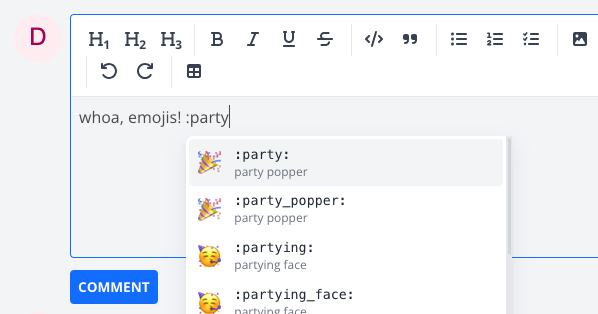
Type : in the editor and start typing a shortcode to get an emoji picker, the same way you would on GitHub or in a chat app. Contributed in #2622.
An accessibility overhaul#
This release includes a big batch of accessibility work. Keyboard users can now reach and operate things that used to be mouse-only: list-view task links, kanban cards, the task title, checkboxes, and the editor toolbar. There are visible focus rings on inputs and controls, and label text colors are now picked by actual contrast ratio. The skip-to-content link moves focus properly and icon-only buttons have accessible names. Screen readers now get told about things like sort state, result counts, expanded and collapsed sections, and comment and attachment counts. If you rely on a keyboard or a screen reader, Vikunja should feel a lot better to use. Landed across #3228, #3234, and a pile of related PRs.
Bot users and a command-line tool for agents and scripts#
Two related additions for people driving Vikunja from scripts and agents rather than clicks. Bot users are accounts meant for scripts and integrations rather than people: they can’t sign in with a password, they’re owned by a regular user, and they get a distinct avatar so you can tell them apart at a glance. See the bot users docs for how to create one.
Alongside that there’s veans, a new command-line tool built for driving Vikunja from a terminal or an agent. It signs in over OAuth, resolves tasks by PROJ-NN or #NN IDs, and can create, update, claim, and list tasks. It’s built and published alongside the main Vikunja binary. See the veans docs to get started.
Reply to comments#
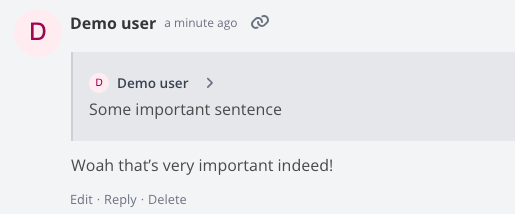
You can now reply to a task comment. The reply pulls in a quote of the original and gives you a chevron to jump back to it, so longer discussions on a task stay readable (#2782).
Other notable changes#
A few smaller things worth calling out:
- Native package repositories. You can now install Vikunja from apt, rpm, pacman, and apk repositories for one-line installs on Debian/Ubuntu, Fedora/RHEL, Arch, and Alpine. The packages are GPG-signed. See the install docs for the per-distro setup.
- Relevance-ranked search. Search results are now ranked by relevance instead of a fixed order, with title matches weighted above description matches (when you’re using the ParadeDB search backend).
- Two new languages. Greek and Persian are now selectable in the language picker.
- Default reminders for quick-add. You can set default reminders that get applied to tasks you quick-add with a due date, so recurring “remind me the day before” habits don’t need setting up every time.
- Any weekday as week start. You can now set any day as the start of your week, not just Sunday or Monday.
- Atom feed for notifications. Your notifications are now available as an Atom feed you can subscribe to with an API token (#2758, #2760).
- Opt-in share duplication. When you duplicate a project, duplicating its shares is now opt-in rather than automatic (#2932).
Fixes and improvements#
A handful of bug fixes worth calling out specifically, many from external contributors:
- CalDAV got a lot of attention this release. Deletions now sync to iOS Reminders correctly, so removing a task on one side actually removes it on the other. Thanks to @kallegrens for contributing this in #2721! Reminders written as ISO 8601 week durations now parse correctly, thanks to @TowyTowy in #3183, and requests for a project that can’t exist now return a proper 404, thanks to @remilapeyre in #2796.
- Recurring tasks return to their original bucket when there’s no default bucket set, instead of getting stranded. Thanks to @nithinvarma411 for contributing this in #2806!
- Webhook basic-auth fields now use consistent casing, so authenticated webhooks stop failing on picky servers. Thanks to @civascu for contributing this in #2688!
- The assignee list preloads on click with the current user first, so assigning yourself is quicker. Thanks to @Tokra110 for contributing this in #2704!
- The new-comment form moves to match your sort order, so it’s where you expect it whether you read oldest or newest first. Thanks to @0xa1d0 for contributing this in #2789!
- Frontend settings no longer get double-encoded when you update your account. Thanks to @rbtr for contributing this in #2793!
- Bot-created projects are now assigned to the bot’s owner instead of being orphaned. Thanks to @13rac1 for contributing this in #3070!
New to Vikunja?#
Vikunja is the open-source, self-hostable to-do app. It lets you organize all kinds of things, from your shopping list to a multi-month project with multiple team members. Different ways to view, filter and share your tasks make this a breeze.
Check out the features page to learn more about all of its features.
How to Upgrade#
To get the upgrade, simply replace the Vikunja binary with the new release from the downloads page or pull the :latest docker image.
You can also check out the update docs for more information about the process.
Closing#
As usual, you can find the full changelog in the GitHub repo.
If you have any questions about this release, please reach out either in the community forum, Bluesky, or Mastodon.
Thank you for using Vikunja, and I look forward to bringing you more enhancements in future updates!